

If it’s linked to an affiliate program, a hosting review can generate a solid passive income stream. To make it work, though, you need to build trust with your readers, who will assume upfront that your review isn’t unbiased since you earn a commission on sales.
In this guide, we’ll walk through how to write a review for a hosting service you genuinely recommend and how to convince your visitors of its value. We’ll cover how to structure it, which key aspects of the service to highlight, and what elements to include to make your words more credible. You’ll also find some tips to help it rank on search engines.
If you haven’t already, check out SupportHost’s affiliate program.
Table of Contents
How to structure a hosting review
Let’s look at the different parts that make up an effective hosting review and what aspects you should highlight.
Adding the review title
The review title, which goes in H1, must include the exact name of the hosting service being reviewed, both for recognition and SEO purposes. It’s also helpful to include terms that reflect search intent — such as “review”, “opinions”, “test” — since users commonly include these in their search queries.

Writing the introduction
In the introduction, you can present the hosting provider and explain who this service is best suited for and why. To boost the review’s credibility, consider opening with a quick pros and cons overview, either as a table or a bullet list.
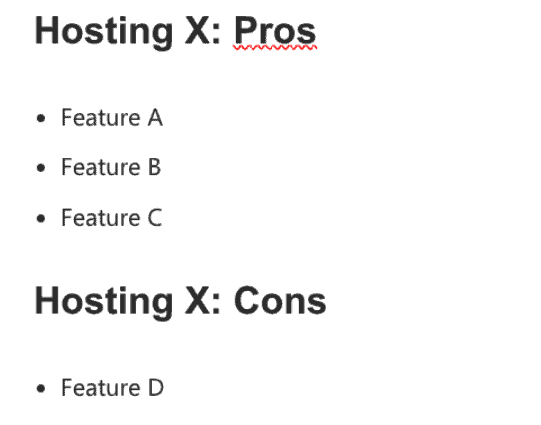
For the same reason, it makes sense to clarify upfront when it’s better to look elsewhere and point readers who aren’t the right fit toward more relevant content. For example, there’s little point in outlining all the advantages of a mid-to-high-end hosting service to users whose main priority is keeping costs down — you’re better off pointing them straight to a guide on choosing budget hosting.
Describing the main hosting features
The body of a hosting review should cover the most relevant features of the service, which can be grouped as follows:
- speed
- technical support
- ease of setup and site management
- reliability
- security and backups
- server access type
- plans and pricing
- other useful features for your site.
Speed
Hosting speed is one of the aspects customers care most about, especially given its impact on SEO rankings. When covering it, it’s worth mentioning whether:
- there’s an option to choose server location
- a server-side caching system is included, which is more efficient than a caching plugin
- bandwidth is unlimited or not (this may vary by plan)
- the hosting uses SSD drives, which offer better performance and reliability than traditional hard drives.
Technical support
Technical support is another aspect customers weigh heavily, so highlight whether:
- response times are fast and whether support is available 24/7, as with SupportHost
- assistance is provided in the customer’s language and by genuine experts
- there’s a guaranteed response time
- the level of support varies depending on the plan.
Another important factor for users — especially those without technical expertise — is site migration support, meaning the option to hand the process off to the hosting provider.
If you need inspiration for writing this part of the review, check out our article on the importance of support in a hosting service.
Ease of setup and site management
Both experienced users who build and manage sites themselves, and first-time bloggers, will want to know whether the provider’s control panel is intuitive and easy to use, and how straightforward it is to set up a site with WordPress or other platforms.
That’s why it’s worth highlighting whether pre-installed WordPress hosting is available, or WooCommerce hosting to build an online store with WordPress without complex setup, or whether Softaculous can be used to install your preferred CMS in just a few clicks.

Reliability
Your hosting review should also specify the uptime rate and whether it’s guaranteed, meaning whether the contract includes compensation if the promised value isn’t met.
visto un rimborso in caso il valore promesso non venga rispettato.
Depending on your audience, it may be helpful to translate the uptime percentage into actual hours of downtime per year. For example, 99.5% uptime means the site could be offline for around 44 hours a year — acceptable for a personal blog, but potentially critical for an online store.
Transparency on resource usage and limits
Let readers know whether the provider clearly states the hosting plan limits, in terms of resource allocation or process counts, and whether it’s possible to monitor resource usage from the control panel.
If your provider uses CloudLinux and has the feature enabled, you can show how to check usage from cPanel under Metrics > Resource Usage.
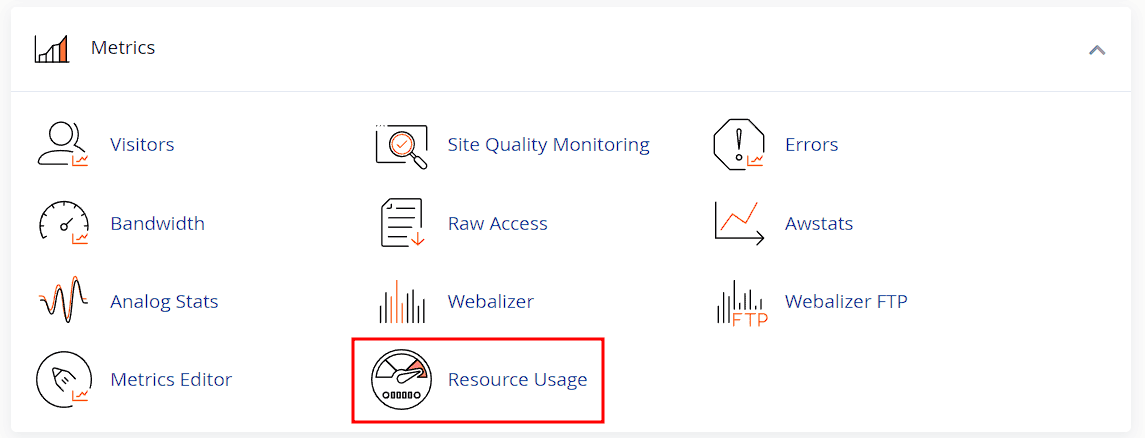
You can also include a screenshot of the screen showing real-time usage graphs.
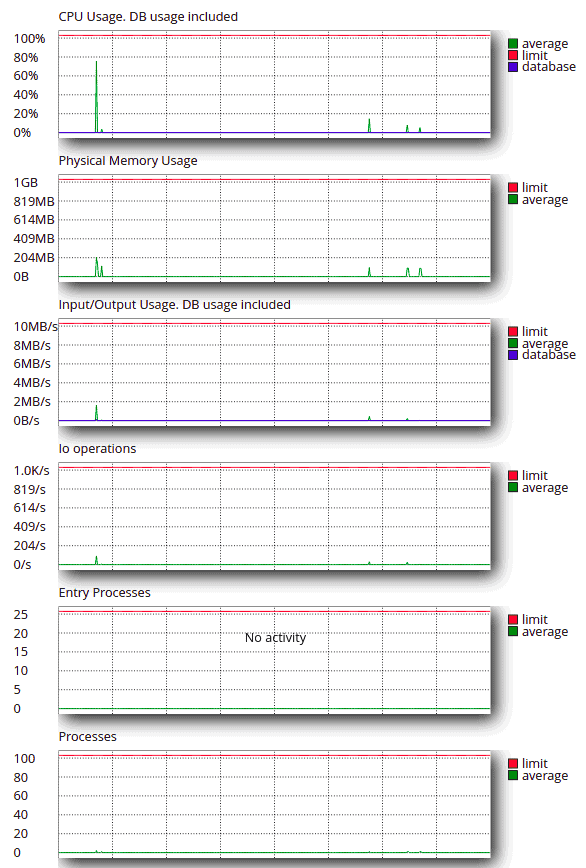
And how to check in the Dashboard whether there have been any throttling events in the past 24 hours.

Security and backups
If you’re reviewing a secure hosting service, it will likely feature the following — all worth calling out:
- reliable firewalls
- DDoS attack protection
- antivirus and antimalware tools
- proactive monitoring.
If the provider includes a free SSL certificate, that’s definitely worth mentioning.
It’s also important to let readers know whether the hosting includes automatic backups and how frequently they run. Backup location matters too, if they’re stored in separate data centers from the main hosting infrastructure, as with SupportHost, they’re better protected.
Server access type
For users evaluating a hosting purchase, it’s helpful to know whether and how they can access their site’s files. Explain whether the provider offers a hosting management panel — cPanel, Plesk or DirectAdmin — and whether site directories can be accessed via FTP, SFTP, or SSH.
Plans and pricing
Anyone reading a hosting review wants to know what the service costs to see whether it fits their budget and whether it’s worth it. That’s why a breakdown of available pricing plans is always useful.
Hosting costs vary depending on the type, which usually falls into one of these categories:
- WordPress and CMS hosting
- shared hosting
- dedicated and semi-dedicated servers
- managed and unmanaged cloud
- VPS.
You can list the different plans for the most popular hosting type, or the entry-level plan for each category, and specify both starting prices and renewal costs.

Other useful site features
Explain whether the following are available and included in the hosting cost:
- the ability to create a site staging environment;
- an email hosting service, one or more email addresses tied to the site’s domain
- multi-domain hosting or partitionable web space.
It’s also useful to let readers know whether the provider specifies the number of additional domains that can be linked to the same plan, and if unlimited domains are offered, that’s definitely worth highlighting.
WordPress users may also want to know whether the hosting supports command-line management via WP-CLI.
Adding screenshots
As with any review, using original images matters, they can rank in Google Image Search and make the review more credible by showing you’ve personally tested the service.
You can take screenshots or short screen recordings while using the management panel, installing or managing a site, monitoring resources, chatting with support, and so on.
To be effective, screenshots should above all be clear:
- choose a screen capture tool that delivers adequate resolution (we use Flameshot, which saves in .png)
- select a meaningful portion of the screen and try to exclude anything that distracts from the concept you’re illustrating
- add arrows or highlights when you need to draw attention to specific elements.

Remember to optimize your images for SEO before uploading them.
Showing real-world tests
The most convincing way to prove that a hosting service is fast is to include tests you ran yourself on a site hosted on the service you’re reviewing. Your review could include, for example:
- a page speed test, which you can run easily using GTmetrix or PageSpeed Insights
- a TTFB test (Time To First Byte), available on GTmetrix and WebPageTest
- an uptime test over a period of at least 3 months, using UptimeRobot (free) or a premium Pingdom plan (free trial for 14 days).
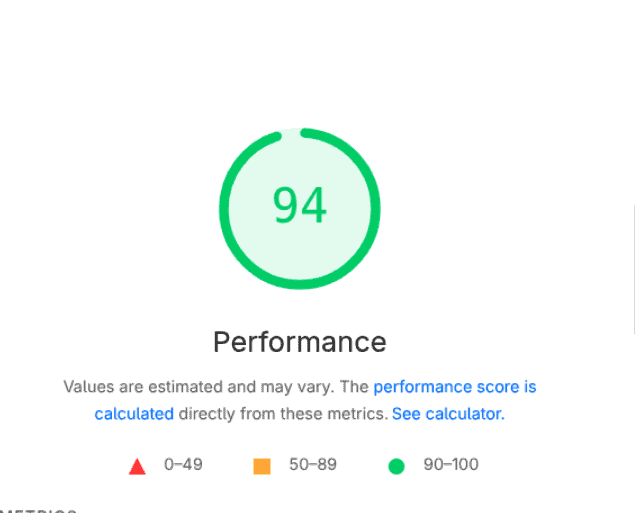
Beyond standard performance tests, you could also document a live support conversation to show real response times.
It’s helpful to provide benchmark values for each metric — such as Google’s thresholds, which we covered in our guide to PageSpeed Insights — or comparison data from other hosting providers.
Including comparisons with other hosting services
Comparing the hosting provider you’re reviewing against similar services helps users better assess the quality-to-price ratio. Choose hosting services with a comparable target audience and price point, and organize the data in a comparison table or bullet list.

From an SEO perspective, adding a hosting comparison within your review lets you capture related keywords such as “hosting X vs hosting Y”, strategic terms typed by users who are actively deciding which service to buy.
Writing a conclusion that helps readers decide
The final section of a hosting review is your chance to push readers toward action. Use it to recap the service’s key strengths and remind them who it’s best for, then close with a clear CTA.

Including an FAQ section
An FAQ section can clear up lingering doubts and improve conversion rates, as well as help you capture long-tail keywords that are hard to work in naturally elsewhere on the page. Keep answers concise and focus on questions people are actually asking — and searching for on Google — when considering switching hosting providers. For example: “how to move a site from one host to another“, “how to migrate a WordPress site“, or “how to handle email migration“.
Adding the affiliate link
If you want your hosting review to convert, you need to place your affiliate link:
- near the top, as a text link
- throughout the body, as text links or buttons
- in the conclusion, where a button with a proper CTA tends to work best.
As always, link anchor text should read naturally in the language of your site and flow logically with the surrounding content.
Optimizing the review for SEO
Apply all on-page SEO best practices to your hosting review — and in particular the following — to make it easier to find on search engines.
Add schema markup for products to help search engine crawlers understand what the page is about, which can boost both SERP visibility and click-through rate (CTR).
Organize content with a clean H1, H2 (and where needed, H3 and H4) hierarchy, with your primary keyword and related terms appearing in headings. The page’s SEO title should include the name of the hosting service.

Where possible, add internal links pointing to related guides on your site, and links from other pages pointing back to the hosting review.
Your primary keyword will include the hosting name. Through keyword research you can identify related terms worth dedicating sections to, or using to build heading titles.
Keep in mind that Google has long had a system for evaluating reviews and provides guidelines on how to write them. On top of what we’ve already covered, Google recommends:
Describe how a product has evolved from previous versions or models to bring improvements, address issues, or otherwise help users make a purchase decision.
More tips for an effective hosting review
A hosting review that is both genuinely useful and persuasive can only be written by someone who knows the subject, either through working in the industry or through hands-on testing of the service and its competitors.
Share your firsthand experience with the hosting rather than simply restating information from the provider, and where possible, incorporate feedback from other customers.
Your review will be even more effective if you can put yourself in the shoes of different types of users who might be weighing up a hosting purchase — to understand what they’d want to know, and what they should know, before buying.
Also explain how the provider addresses common issues hosting customers face, to preempt objections from readers.
Additional tactics that can make your hosting review more effective:
- make affiliate link URLs less off-putting by shortening and customizing them with tools like Bitly
- use tables, bullet lists, and callout boxes to present information at a glance and for comparisons and summaries
- format for maximum readability, applying the UX best practices covered in our guide to user experience in WordPress
- apply copywriting frameworks — AIDA, PAS, and others — to frame your hosting experience as a story
- be upfront about your affiliate relationship and disclose that you earn a commission on sales generated through your links.
Bear in mind that hosting reviews date quickly because plan features change often. Keep them updated if you want to maintain credibility with both your audience and search engines.
Keep in mind that there are ways to promote a hosting service even without a website. These methods can also help increase the visibility of the content you publish on WordPress or other CMS platforms.
Conclusion
In this guide on how to write a hosting review, we’ve looked at how to structure one so that it is both credible and conversion-focused: from the title to the FAQ section, including tests, screenshots, and the placement of affiliate links in CTAs.
An effective review always has a few key characteristics: it is based on firsthand experience and answers the specific questions people have when choosing a hosting provider. It’s even better if it is also optimized for SEO, so more people can find it.
Have you already written reviews of hosting services or other affiliate products or services? Let us know how it went in the comments.
Ready to build your WordPress site?
Try our service free for 14 days. No obligation, no credit card required.
