

Every website begins with a domain name. It’s the address people use to find you and an early decision when building your website and online presence.
Buying a domain is straightforward, but if it’s your first time, the variety of extensions and registrars can be confusing.
This guide covers how to buy a domain name, how to choose the right one for your project, and which services should be included at no extra cost.
Table of Contents
What Is a Domain Name?
A domain name is the web address people use to find your website. Instead of typing a long string of numbers (called an IP address) into a browser, visitors can type something like “yoursite.com” and land right on your homepage.
Behind the scenes, the Domain Name System handles the translation. DNS maps a human-friendly domain name to the correct IP address so your browser knows which server to connect to. This entire process happens in a fraction of a second.
Every domain name consists of two main parts.
The top-level domain (TLD) is the extension at the end of the address. Common examples include .com, .org, .net, and country-specific options like .it or .de.
The second-level domain (SLD) is the unique name you choose for your domain. In “supporthost.com,” the SLD is “supporthost,” and the TLD is “.com.”
You can also create subdomains after registration. These add an extra level in front of your main domain, like “blog.yoursite.com” or “shop.yoursite.com.” Subdomains are optional and can be set up at any time after you’ve registered your domain.
Types of Domain Extensions (TLDs)
Not all domain extensions are the same. The TLD you choose sends a message to visitors about your site, your audience, and your purpose. Here’s a breakdown of the main types.
Generic top-level domains (gTLDs) are the most widely used extensions on the web. These include .com, .org, and .net. The .com extension is by far the most popular, generally considered the most trustworthy, and easiest to remember. If you’re unsure which extension to choose, .com is almost always a safe bet.
Country-code top-level domains (ccTLDs) are tied to a specific country or region. For example, .it is for Italy, .de is for Germany, .fr is for France, and .eu covers the European Union.
These extensions are a good choice if your website targets a specific country or local audience. A visitor in Germany may feel more comfortable clicking on a .de website than a generic .com.
Newer and specialty TLDs have become more common in recent years. Extensions like .io, .ai, .store, .blog, and .tech can help you stand out or signal what your site is about. However, these specialty extensions are often more expensive than standard options and may not carry the same level of recognition with the average visitor.
The best TLD for your project depends on your goals. If you’re building a business with an international audience, .com is the most versatile option. If you’re targeting a specific country, a ccTLD makes sense. And if you’re in a niche space where a specialty TLD aligns perfectly with your brand, it could be worth the investment.
How to Choose the Right Domain Name
Your domain name creates your brand identity. Take the time to choose carefully, because changing it later causes headaches, and can lead to broken links and lost search rankings, if not migrated properly.
Here are some practical tips to help you pick a strong domain name.
Keep your domain short and simple. It’s easier to remember, type, and share. Avoid names that require lengthy explanations.
Match your domain to your brand. Use your business or brand name as your domain when possible. For a business called Greenleaf Design, use greenleafdesign.com. This consistency makes it easy for customers to find and trust you.
Avoid hyphens and numbers. They make domains harder to remember and increase typos. Most people won’t add a hyphen or number when typing it out.
Consider your audience. Use a country TLD for local sites, and a global extension like .com for broader reach.
Don’t rely on keywords in your domain. There’s a common myth that putting keywords in your domain name will help you rank higher in search results. Google has confirmed multiple times that keywords in a domain don’t give you a ranking boost. Choose a name that works for your brand, not one that’s stuffed with search terms.
Take your time choosing a domain name. Changing it later means updating links, redirecting traffic, and risking search engine visibility.
How to Buy a Domain Name (Step by Step)
Now that you know what makes a good domain name, let’s walk through the actual process of buying one. It’s simpler than you might think.
1. Brainstorm Your Domain Name
Start by making a list of potential names. Think about your brand, what your website is about, and what would be easy for your target audience to remember. Write down several options, so you have alternatives ready in case your first choice is taken.
2. Check Domain Availability
Every domain name is unique, no two sites can share the same domain. Registration is first-come, first-served. If your preferred name is taken, try another name or extension.
Most registrars offer a search tool to check if a domain name is available. If .com is taken, other extensions may be open.
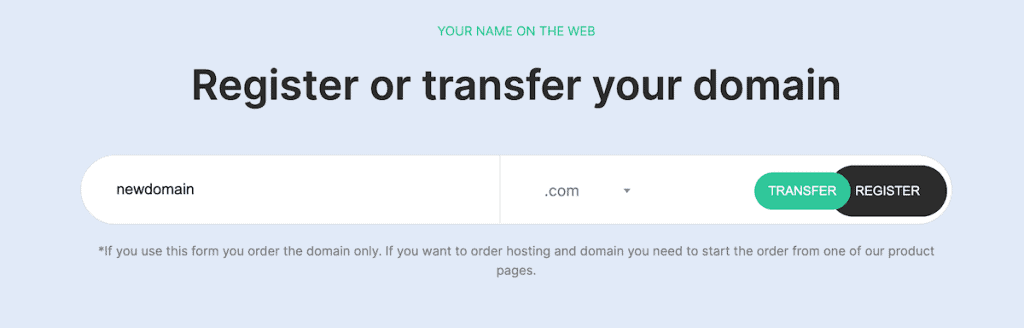
3. Choose a Reputable Registrar
A domain registrar is a company that registers domain names for you. Choose one accredited by ICANN (the Internet Corporation for Assigned Names and Numbers). ICANN accreditation ensures the registrar follows global domain rules and standards.
Beyond accreditation, pay attention to what’s included in the registration price. Some registrars charge extra for essential services like Whois privacy protection, DNS management, and DNSSEC. Others include these at no additional cost.
SupportHost supports over 600 extensions, including .com, .net, .org, and country-code TLDs like .it and .eu. Plus, every domain registered with SupportHost includes free Whois Privacy, free DNSSEC, and free DNS management, services that other registrars often charge separately for.
4. Pick Your TLD
After finding an available domain name, pick the extension that fits your project. If unsure, choose .com, the most recognized and trusted option. For a region-specific audience, use a country-code TLD like .it, .de, or .eu.
5. Review What’s Included
Before you buy, check exactly what services are included with your domain registration. Look for these three key features.
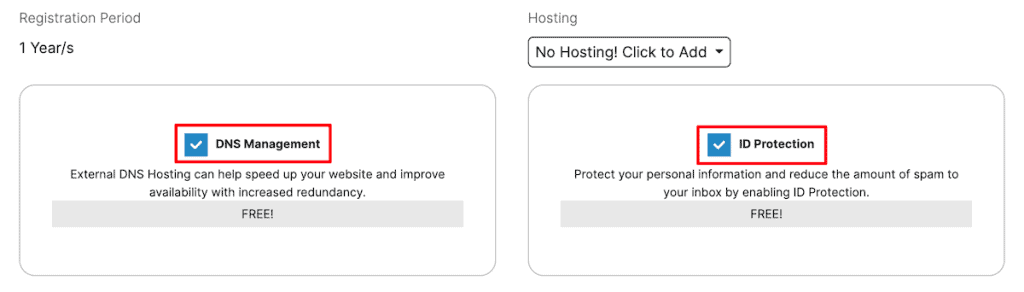
Whois Privacy Protection keeps your personal information, like your name, email address, and phone number, hidden from the public Whois directory.
Without it, anyone can look up who owns a domain and see your contact details. Some registrars charge an annual fee for this service, while others include it free of charge.
DNSSEC (Domain Name System Security Extensions) adds a layer of security to your domain by using cryptographic signatures to verify DNS records. This helps protect your visitors from being redirected to fake or malicious websites through attacks like DNS cache poisoning or spoofing.
Think of it as an authentication layer that confirms your domain’s DNS information hasn’t been tampered with. Not every registrar offers DNSSEC, and those that do sometimes charge extra for it.
DNS Management lets you control your domain’s DNS records. Use it to point your domain to a hosting server, set up email, create subdomains, and manage settings. Make sure full DNS management is included before you buy.
With SupportHost, all three of these features, Whois Privacy, DNSSEC, and DNS management, are included at no extra cost with every domain registration.
6. Complete Your Purchase
Follow your registrar’s checkout process to finalize the registration. You’ll need to provide some basic contact information, which ICANN requires for every domain registration. If your registrar includes Whois Privacy (as SupportHost does), this information will be hidden from the public directory.
Domains are typically registered for one year, but most registrars let you register up to 10 years at once.
7. Set Up Auto-Renewal
Once your domain is registered, make sure you enable auto-renewal. When a domain expires, it becomes available for anyone to register. If you forget to renew, someone else could grab your domain before you get a chance to re-register it.
Most registrars send reminders when your domain is about to expire, but auto-renewal is the safest way to avoid losing it.
How Much Does a Domain Name Cost?
The cost of a domain name depends on a few factors, including the extension you choose and the registrar you use.
For standard extensions like .com, .net, and .org, you can expect to pay somewhere between $10 and $20 per year. Country-code TLDs like .it or .de fall in a similar range. Newer or specialty extensions like .io or .ai tend to cost more, sometimes $30 to $50 per year or higher.
At SupportHost, a .com domain registration costs just under $15 per year. SupportHost actually offers a breakdown of the price of different domain name extensions for your chosen domain.

It’s important to understand that when you buy a domain name, you’re actually leasing it. You don’t own it permanently. Instead, you pay an annual fee to maintain your registration. As long as you keep renewing (or have auto-renewal enabled), the domain stays yours.
One thing to watch out for is renewal pricing. Some registrars offer deeply discounted first-year pricing to attract new customers, then charge significantly more when it’s time to renew. Always check the renewal price before you commit to a registrar.
Premium domains are a different story entirely. These are short, highly memorable, or keyword-rich domain names that are either already registered or priced higher by the registry.
Premium domains can cost anywhere from a few hundred dollars to millions. The domain Voice.com sold for $30 million in 2019. For most website owners a standard domain registration is all you’ll need.
Can You Get a Domain Name for Free?
Domain registration always involves a fee. There’s no way around that. However, many hosting providers bundle a free domain name with their hosting plans, which effectively brings your domain cost to zero.
At SupportHost, every hosting plan (except dedicated servers and cloud VPS) includes a free domain for life when you choose an annual billing cycle or longer. As long as you continue renewing your hosting plan, your domain stays free with no additional charges.
The extensions eligible for this free registration include some of the most popular options: .com, .it, .eu, .us, .de, .fr, .ch, .es, .li, .be, .cc, .nl, .ro.
If you’re planning to build a website anyway, bundling your domain with a hosting plan is the cheapest approach. You save on the domain, and having everything managed by a single provider keeps things simple.
What to Look for in a Domain Registrar
Not all domain registrars are created equal. Some offer great value with transparent pricing and included features, while others rely on hidden fees, confusing upsells, and renewal price hikes.
The first thing to check is pricing. A lot of registrars will lure you in with a cheap first-year rate, then jack up the price when it’s time to renew. Always look at what you’ll pay in year two and beyond before you commit.
Next, look at what’s actually included with your domain. Whois Privacy, DNSSEC, and DNS management are essential, but some registrars treat them as paid add-ons. If you’re being charged extra for these, you’re overpaying.
You also want a registrar that makes domain management easy. Updating DNS records, managing renewals, and toggling features on and off should take a few clicks, not a support ticket.
And speaking of support, make sure it’s fast and helpful. When your domain has an issue, you need fast answers from people who actually understand the technical side.
Finally, think about what happens if you want to leave. A good registrar makes it easy to unlock your domain and grab your EPP code for a transfer. A bad one makes the process as painful as possible to keep you locked in.
SupportHost checks all of these boxes. Free Whois Privacy, DNSSEC, and DNS management come with every domain, pricing stays the same at renewal, and our support team is available when you need them.
How to Register a Domain with SupportHost
Registering a domain with SupportHost is quick and easy. You have two main options.
Option 1: Register a domain on its own. If you just want to secure a domain name without purchasing hosting right away, head to the domain registration page on the SupportHost website.
Then, enter the domain name you want, check its availability, and follow the guided steps to complete your registration. Your domain will come with free DNS management, Whois Privacy, and DNSSEC right out of the box.

Keep in mind that if you register a domain on its own without a hosting plan, you won’t be able to create email addresses like name@yourdomain.com. However, you can set up free email redirects that forward messages to another email address.
Option 2: Register a domain with a hosting plan. This is the most affordable option. Choose the hosting plan that fits your needs, and during the checkout process, you’ll be able to register your domain for free. The domain will remain free for life as long as you continue renewing your hosting plan on an annual billing cycle or longer.

SupportHost supports over 600 domain extensions, so chances are good that the TLD you’re looking for is available. And if you don’t see the extension you need in the list, you can reach out to the SupportHost team, as they can often add it for you.
What Happens After You Buy a Domain?
Once your domain is registered, you’ve completed the first step. But a domain name on its own doesn’t give you a website. Here’s what comes next.
Connect your domain to a hosting account. Your hosting provider is where your website files live.
You’ll need to point your domain’s DNS records to your hosting server so that when someone types your domain into a browser, they’re directed to the right place. If you register your domain and hosting through the same provider (like SupportHost), this is usually handled automatically.
Set up email. With a hosting plan, you can create professional email addresses using your domain, like info@yoursite.com or hello@yoursite.com. This is a small detail that goes a long way in building credibility.
Install an SSL certificate. An SSL certificate encrypts the connection between your website and its visitors, which is essential for security and search engine rankings. With SupportHost, a free SSL certificate is included with every hosting plan and automatically generated once your domain points to their servers.
Build your website. With your domain, hosting, and SSL in place, you’re ready to start creating your site. Whether you’re using WordPress, Joomla, or another CMS, your hosting dashboard will have tools (like Softaculous) that make installation quick and easy.
Buy Domain Name FAQs
Can you buy a domain name permanently?
No. Domain names are leased, not owned outright. The maximum registration period is typically 10 years. After that, you’ll need to renew your domain to keep it. Enabling auto-renewal is the easiest way to make sure your domain never expires unexpectedly.
What’s the best domain extension?
For most websites, .com is the best choice. It’s the most widely recognized, the easiest to remember, and the one that carries the most trust with visitors. That said, if you’re targeting a specific country, a ccTLD like .it or .de can be a better fit. Choose the extension that aligns with your audience and your brand.
What happens if my domain expires?
When a domain expires, it typically enters a grace period during which you can still renew it (sometimes with a late fee). If you don’t renew during this window, the domain eventually becomes available for anyone to register. This is why auto-renewal is so important.
Can I change my domain name after registration?
No. Once a domain is registered, the name itself cannot be changed. If you want a different domain, you’ll need to register a new one and update your website and hosting settings accordingly. You can choose to let the old domain expire or keep it and redirect it to your new domain.
What is DNSSEC and why does it matter?
DNSSEC stands for Domain Name System Security Extensions. It adds cryptographic signatures to your domain’s DNS records, which helps verify that the information hasn’t been altered or tampered with. This protects your visitors from being redirected to fake websites through attacks like DNS cache poisoning. Not all registrars include DNSSEC, but SupportHost provides it for free with every domain.
Closing Thoughts: How to Buy a Domain Name
Buying a domain name is one of the simplest and most important steps in getting your website online. The process comes down to choosing a name that fits your brand, picking the right extension, and registering through a reputable registrar that doesn’t nickel-and-dime you for essential features.
When you register a domain with SupportHost, you get Whois Privacy, DNSSEC, and DNS management included at no extra cost. And if you’re also setting up hosting, you can get your domain for free, for life, with an annual hosting plan.
With over 600 extensions to choose from, transparent pricing, and a support team that’s available when you need them, SupportHost makes the registration process as painless as it should be.
Now it’s your turn. Have you already registered your domain, or are you still deciding on the perfect name? Share your experience in the comments below.
Ready to build your WordPress site?
Try our service free for 14 days. No obligation, no credit card required.


