

If you’re building your first website, you’ve probably heard the terms “domain” and “hosting” thrown around like everyone knows what they mean. But, for those building their first sites, these concepts can be confusing.
Essentially, you need both hosting and a domain name to get your website online, but they serve different purposes. One gives your site an address, the other gives it a home. Understanding the difference will save you time, money, and frustration down the road.
Below, you’ll learn the key differences between domain vs hosting, how they work together, and why you can’t have a functioning website without both.
Table of Contents
What is a Domain Name?
A domain name is your website’s address on the internet. It’s what people type into their browser to find you. Think of it as your digital street address.
For example, when you type “supporthost.com” into your browser, you’re using a domain name to reach this site. Every website that’s live on the internet has a unique domain name.

Why Domain Names Matter
Without a domain name, visitors would need to type in a string of numbers called an IP address to reach your site. Something like 192.168.1.1. That’s not exactly memorable.
Domain names solve this problem by using the Domain Name System (DNS) to connect an easy-to-remember name with the actual IP address of your server.
Understanding Domain Levels
Domain names are made up of three different levels separated by dots. Here are the three elements:
- Top-level domain (TLD): This is the extension at the end, like .com, .org, or .ca. These can be generic (.com, .net) or country-specific (.ca for Canada, .uk for United Kingdom).
- Second-level domain: This is the actual name you choose, like “yourbusiness” in yourbusiness.com. This is the part you register and customize for your brand.
- Third-level domain (subdomain): These are optional additions you can create after registering your main domain, like blog.yourbusiness.com or shop.yourbusiness.com.
How Much Does a Domain Cost?
Domain pricing varies based on the extension you choose and where you register it. Common extensions like .com typically run around $11 to $15 per year. While country-specific domains like .ca might cost $10 to $20 annually. Specialty extensions like .ai or .shop can range even higher.
If you’re purchasing a domain name here at SupportHost, then you can actually get a free domain name by purchasing a hosting plan.
When you purchase an eligible hosting plan for at least one year, you get a free domain that stays free as long as you keep your hosting active. No surprise renewal fees after year one.
The free domain includes popular extensions like .com, .it, .eu, .us, .de, .fr, .ch, .es, .li, .be, .cc, .nl, and .ro. This works with most hosting plans including shared, WordPress (and other CMS plans), semidedicated, LiteSpeed hosting and more.
Another thing to keep in mind, domain registration isn’t a one-time purchase. You’ll need to renew your domain annually to keep it. If you forget to renew, the domain expires and becomes available for anyone else to register.
What is Web Hosting?
Web hosting is the service that stores your website’s files and makes them accessible to visitors on the internet 24/7.
Think of hosting as renting space on a computer (called a server) that’s always connected to the internet. Your website’s files, images, videos, and database all live on this server.
Without hosting, you might have a domain name, but your website doesn’t exist anywhere. So, even if you have a domain name, it points to nothing.
Types of Web Hosting and Costs
There are a variety of different types of web hosting available, depending on your needs. For example, a site that runs WordPress performs best on WordPress hosting.
Let’s explore a few of the different types of hosting available:
- Shared hosting is the most affordable option. Your website shares a server with other sites, splitting the resources and costs. This works great for small business sites, blogs, and new websites with modest traffic. Plans typically run $44 to $190 per year.
- WordPress hosting is shared hosting optimized specifically for WordPress sites. These plans often include features like one-click WordPress installation, automatic updates, and WordPress-specific security measures. Pricing is similar to shared hosting, usually $44 to $198 annually.
- Cloud VPS gives you dedicated resources on a virtual server within a cloud infrastructure. If one physical server fails, your site automatically moves to another, ensuring reliability. These plans suit growing sites with increasing traffic or special requirements. Expect to pay $80 to $210 per month for managed solutions.
- Dedicated servers provide an entire physical server just for your site. You get maximum control and resources, but you’re also responsible for server management unless you pay for a managed option. These run $75 to $290+ per month (plus activation fee) and make sense for high-traffic sites or those with specific technical needs.
- Reseller hosting lets you sell hosting services to others. If you’re building sites for clients or want to start a hosting business, these plans range from $184 to $670 per year.
For most new sites, shared hosting provides everything you need at a price that makes sense. You can always upgrade as your traffic grows.
Domain vs Hosting: The Key Differences
Let’s make this crystal clear. Your domain name is like your business address. It tells people where to find you. It’s the name they remember and type into their browser.
Your hosting is like the physical building at that address. It’s where your business actually operates, where all your stuff is stored, and where customers can interact with what you offer.
You need both. An address without a building is just an empty lot. A building without an address means nobody can find you.
How Domains and Hosting Work Together
Here’s what happens when someone types your domain into their browser:
- The browser contacts DNS servers to look up your domain name
- DNS servers return the IP address associated with your domain
- The browser connects to your web hosting server using that IP address
- Your hosting server sends your website files back to the visitor’s browser
- The browser displays your website
Pretty impressive, right? There’s so much going on in the milliseconds it takes for your site to load.
Can You Buy A Domain and Hosting Separately?
Yes, you can purchase your domain from one company and your hosting from another. Many people register their domain name early to secure it, then add hosting later when they’re ready to build their site. This is smart if you’re still in the planning stages, but don’t want to lose your preferred domain name.
However, buying both from the same provider simplifies management. You have one account, one renewal date, and one support team to contact if issues arise.
Many hosting providers sweeten the deal by including a free domain with hosting plans. At SupportHost, eligible hosting plans include a free domain that stays free as long as you maintain your hosting. This saves you money and keeps everything in one place.
If you already own a domain elsewhere, you can still use it with SupportHost hosting. You’ll just need to update your domain’s DNS settings to point to your new hosting server.
Domain vs Hosting: What You Get With Each
When you register a domain, you get:
- The exclusive right to use that domain name
- The ability to point it to any hosting service
- DNS management tools to control where the domain points
- The option to create custom email addresses using your domain
When you purchase hosting, you get:
- Server space to store your website files
- Bandwidth to deliver your site to visitors
- Email accounts (on most plans)
- Technical support
- Security features like SSL certificates
- Automatic backups (depending on your plan)
- Control panel access to manage your site

Most shared hosting plans give you access to an easy to use control panel (usually cPanel), which makes it easy to manage everything related to your website.
Choosing and Registering Your Domain Name
Your domain name matters more than you might think. It affects how people find you, remember you, and perceive your business.
Here are some best practices when registering a domain name:
- Keep it short and simple. Shorter names are easier to remember and type. Aim for something under 15 characters if possible.
- Make it memorable. Your domain should be easy to spell and pronounce. Avoid numbers, hyphens, and weird spellings that confuse people.
- Use your business name when you can. If your business is called Blue Mountain Bakery, bluemountainbakery.com is your best choice. This builds brand recognition and makes your domain easier to find.
- Consider your extension carefully. While .com remains the most recognized extension, alternatives like .co.uk (for UK businesses) or .it (for Italian businesses).
If your domain name is already taken, then consider a variation on your domain name. For example, if you run a bakery in Seattle, then try “bakeryseattle.com” or “bakeryinseattle.com”. Most the time if you have a unique business name, then it should be available. You can also use business name generators like Namelix, which might give you inspiration to think creatively about your domain name.

You can always try another domain name extension, but it can be weird if your domain is “cardshopseattle.net” and there’s a competitor with the domain, “cardshopseattle.com”.
Domain Registration Process
Registering a domain takes just a few minutes:
- Search for available domains using a domain registrar’s search tool
- Select your preferred domain name and extension
- Choose your registration period (typically 1 to 10 years)
- Complete your purchase and provide contact information
- Verify your email address to activate the domain
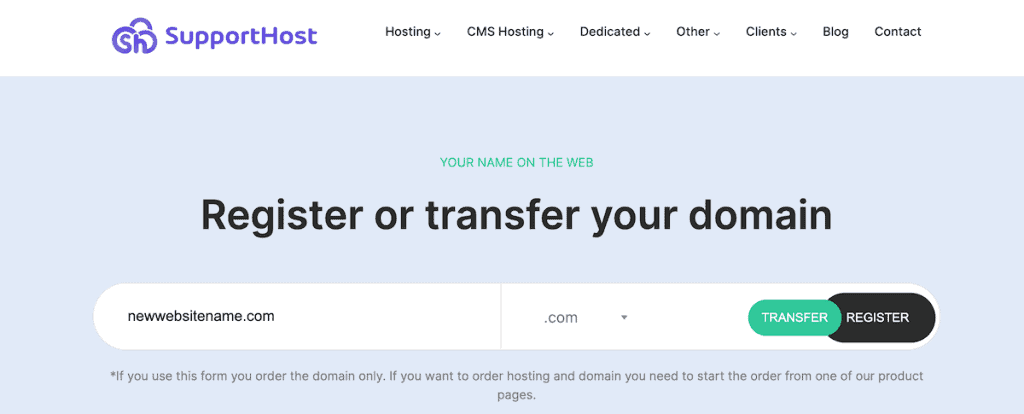
That’s it. You now own that domain for the registration period you selected.
Choosing the Right Web Hosting Plan
With your domain secured, you need hosting that fits your site’s requirements.
Here’s what you’ll want to look for in a hosting plan:
- Storage and bandwidth determine how much content you can host and how much traffic you can handle. Small business sites typically need 5 to 10GB of storage and 50 to 100GB of monthly bandwidth to start.
- Reliability is non-negotiable. Look for providers offering 99.9% uptime guarantees. Every minute your site is down costs you visitors and potential revenue.
- Security features should include SSL certificates for HTTPS encryption, along with malware scanning and DDoS protection.
- Support availability can save you when problems arise. Look for 24/7 support through phone, chat, or tickets. You want help available when you need it, not just during business hours.
- Scalability means your hosting can grow with your site. Can you easily upgrade when traffic increases? What options exist between your current plan and the next tier?
Here are some tips on choosing the right kind of web hosting for your site:
- Blog or personal site: Shared hosting works perfectly. You don’t need extensive resources, and the low cost makes sense for sites that aren’t generating income yet.
- Small business website: WordPress hosting or quality shared hosting provides the features you need with room to grow. Look for plans that include email accounts and SSL certificates.
- Growing traffic or eCommerce: Consider WooCommerce, or cloud hosting for better reliability and dedicated resources. The investment pays off when your site handles real transactions or significant traffic.
- High-traffic or resource-intensive site: Dedicated servers give you maximum control and resources. These make sense when your site generates revenue that justifies the higher cost.
Setting Up Your Domain and Hosting
Once you’ve purchased both hosting and a domain name, you need to connect them. Here’s what to do:
If you’ve bought them from the same provider, then your hosting/domain provider will handle this automatically. The domain is already pointed to your hosting account, and you can start building your site immediately.
If you purchased a domain name and hosting from different companies, then you’ll need to update your domain’s DNS settings to point to your hosting provider’s servers. Your hosting company will provide nameservers that look something like the following:
- ns1.yourhost.com
- ns2.yourhost.com
To change these, log in to your domain registrar’s control panel, find the DNS or nameserver settings, and replace the existing nameservers with the ones your hosting company provided. DNS changes can take 4 to 48 hours to fully propagate across the internet, though they usually complete within a few hours.
Creating Email Addresses
Most hosting plans include email addresses, letting you create professional email addresses using your domain (like name@yourbusiness.com). This looks far more professional than using Gmail or Yahoo addresses for business communication, and it reinforces your brand with every email you send. You can purchase email hosting on it’s own, or choose a hosting plan that offers you free domain email addresses.
Domain Renewal and Management
One very important thing with your domain name is you’ll want to set up automatic renewal to prevent your domain from expiring unexpectedly. Losing your domain because you forgot to renew it is a nightmare you can easily avoid.
Keep your contact information current in your domain registrar’s system. You’ll receive important renewal notices and security alerts at this address.
You can also enable domain privacy if available. This prevents your personal contact information from appearing in public WHOIS databases, reducing spam and unwanted solicitations.
Monitoring Your Hosting
Most hosts allow you to check your resource usage regularly through your hosting control panel. If you’re consistently hitting 80% or more of your storage or bandwidth limits, it’s time to upgrade. The last thing you want is a crash when you’re experiencing high levels of traffic.

Also, schedule time to test your site speed periodically. Slow loading times drive visitors away and hurt your search rankings. If your site slows down, investigate whether it’s a hosting issue or an optimization problem.
Next, make sure your website software is always up to date. If you’re using WordPress or another CMS, regular updates protect against security vulnerabilities and ensure compatibility with your hosting environment.
Finally, review your website backups. Make sure your hosting provider is backing up your site regularly, and verify that you can restore from those backups if needed. Alternatively, you can use WordPress backup plugins to run regular website backups.
Domain vs Hosting FAQs
Can you host a website without a domain?
Technically, yes, using your server’s IP address, but nobody does this in practice. Without a domain, visitors would need to memorize and type a string of numbers to reach your site. It’s also terrible for branding and SEO. Some website builders offer free subdomains (like yoursite.builder.com), but these look unprofessional and hurt your credibility. They’re fine for testing, but not for any serious business site.
Can you have a domain without hosting?
Yes, and this actually makes sense in some situations. You might register a domain to protect your business name before you’re ready to build a site. It’s better to own it now than discover someone else grabbed it when you’re finally ready to launch. You can also use a domain for a business email address without hosting a website.
Do you need to use the same provider?
No, but it often makes things simpler. Using one company for both means a single login, one bill to pay, one support team to contact, and easier management overall. For beginners, this simplification is worth a lot.
However, separating them gives you flexibility. If your hosting provider’s service declines, you can move to a new host without transferring your domain. If you find a better domain deal elsewhere, you can transfer without moving your hosting.
What happens if your domain expires?
When your domain expires, it enters a grace period (typically 30 days) where you can still renew it at the standard price. After the grace period, it moves to a redemption period (another 30 days or so) where you might be able to recover it, but you’ll pay a much higher redemption fee. If you don’t recover it during redemption, the domain becomes available for anyone to register.
Can you change your domain later?
Yes, but it’s complicated and can hurt your site. Changing domains can mean losing any search engine rankings associated with your old domain. If you must change domains, set up 301 redirects from your old domain to your new one. This tells search engines that your content has permanently moved and should transfer most of your search rankings to the new domain.
Can you transfer your domain to a new host?
Absolutely. Domain transfers are pretty straightforward. You need to unlock your domain and get the authorization code. Then, start the transfer process with your new registrar. After that, you’ll need to approve the transfer via confirmation email, and wait for the transfer to complete.
Closing Thoughts: Domain vs Hosting
Understanding the difference between a domain vs hosting is your first step toward building a successful website. Your domain name is your brand and the first thing visitors will associate with your site.
While, your web hosting is your foundation. So, make sure you pick a plan that fits your current needs with room to grow. Things like your loading speed and site performance do have an impact on your site’s success, so your hosting provider needs to be high performing and reliable.
You can choose to purchase a domain and hosting from a separate provider. Or, bundle them together and get a free domain, like here at SupportHost. With both in place, you’re ready to build something great.
Now over to you. Do you already have a domain name for your business? Or are you still deciding between options? Share your experience or questions in the comments below.
Ready to build your WordPress site?
Try our service free for 14 days. No obligation, no credit card required.


