

Choosing how you’ll build your WordPress site shapes everything that comes after. Some people are happy editing inside a theme’s Customizer. Others want full control over every section, header, and template without touching a line of code. If you fall into that second group, Breakdance is one of the builders you’ll keep running into.
People often search for the Breakdance theme, but it isn’t a theme in the usual sense. It’s a visual website builder that can run on top of any theme or replace your theme entirely, handling the entire design itself.
Below, you’ll learn what Breakdance actually does, how to install and set it up, what the free version offers, where the paid plans are worth it, and how it stacks up against builders like Elementor and Bricks.
Table of Contents
What Is Breakdance?
Breakdance is a visual page and site builder for WordPress. That’s the same company behind Oxygen Builder and WP All Import, so they’ve been working on WordPress tools for a long time. Breakdance itself is newer, having first launched a few years ago.
The editor is built on React. Changes preview in real time as you work, without the page reloading every time you tweak something. If you’ve used older builders that lag when a page gets busy, the difference is easy to feel.
Breakdance is a full site builder, so you use it to control your header, footer, blog archives, single post layouts, 404 page, search results, and individual pages. You’re not limited to editing the body of one page at a time.
It works with any WordPress theme, but most people turn their active theme off and let Breakdance run the whole show. Soflyy calls this themeless mode. Starting from a blank canvas avoids CSS conflicts that occur when a theme and a builder both try to style the same elements. For many users, disabling the theme is the cleaner way to build.
Why People Choose Breakdance
A few things pull people toward Breakdance over other builders. Here are some of the most unique features.
Speed and clean output
Performance is the feature people mention first. Breakdance only loads the CSS and JavaScript for the elements you actually use on a given page, instead of dumping a giant stylesheet on every visitor. It also includes a setting called the Bloat Eliminator, which strips unnecessary WordPress assets that slow down pages.
You end up with clean code and fast rendering. Breakdance tends to score well on Google’s Core Web Vitals, and the latest version improved this further by speeding up PHP rendering.
Your final speed still depends on your hosting, your images, and the other plugins you run. The builder gives you a light starting point, but it can’t fix a slow server on its own.
Fewer plugins to hold everything together
A common complaint with older builders is that you end up bolting on extra plugins to get basic features working. Breakdance folds a lot of that into the core product.
You get a form builder, a pop-up builder, WooCommerce templating, and dynamic data support without installing anything extra. Every plugin you remove is one less thing to update, one less possible conflict, and usually a small speed gain.
Real design control
Breakdance ships with 145 elements in the Pro version and 80 in the free one. On top of that, it includes a feature called Element Studio that lets you visually build and style your own custom elements. Advanced users can also drop into code and write PHP, HTML, CSS, and JavaScript directly in the editor when needed.
There’s also a CSS Class Manager, which matters if you build the professional way, meaning you set up reusable classes and apply consistent styling across a site instead of hand-editing every element.
Dynamic data
Dynamic data is content pulled from your WordPress database in real time rather than typed in by hand, like post titles, custom fields, or WooCommerce product prices. This is one area where Breakdance goes further than simpler builders.
Breakdance connects to Advanced Custom Fields and Metabox, lets you build post loops visually, supports repeater fields, and can show or hide elements based on conditions like user role or post category. If you’re building anything data-driven, such as a directory, a listings site, or a store with many products, this feature set makes it possible without custom coding.
How to Install Breakdance
Breakdance isn’t listed in the WordPress plugin repository. Soflyy distributes it themselves, so you download it from their site first, then upload it to WordPress. The free version installs the same way as the paid one.
First, go to breakdance.com and download the free plugin, or log in to your account and download the Pro version if you’ve bought a license. You’ll get a ZIP file.

Then, in your WordPress dashboard, go to Plugins > Add New Plugin and click the Upload Plugin button, then choose the Breakdance ZIP file you downloaded. Next, click Install Now, and once it finishes, click Activate.

If you’re using the Pro version, go to the Breakdance menu in your dashboard, then enter your license key to unlock the paid features.
After activation, Breakdance adds its own menu to your WordPress admin sidebar. That’s your home base for global settings, templates, headers, footers, and the design library.
Setting Up Breakdance
Once the plugin is active, most of your work happens inside the Breakdance editor or the settings area.
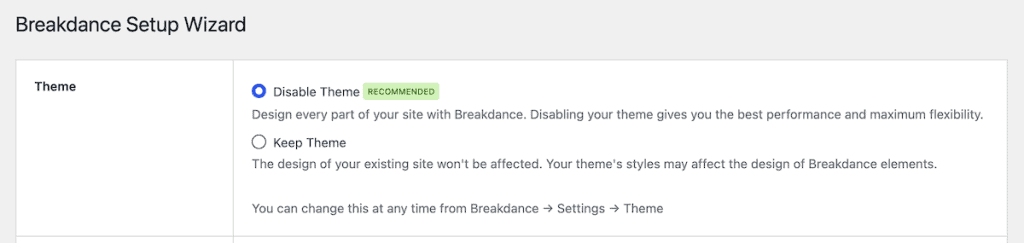
Decide on themeless mode
When you first start, you choose whether to keep your existing WordPress theme or disable it and let Breakdance handle everything. Disabling the theme gives you a clean canvas and avoids styling conflicts. For most new projects, that’s the right call. If you’re adding Breakdance to an established site, you may want to keep your theme at first and switch things over gradually.
After that, click Finish Setup at the bottom of the page.
Set your global styles
Global styles live inside the builder, so open any page in Breakdance to get to them. Then, click Breakdance > Edit Global Styles.
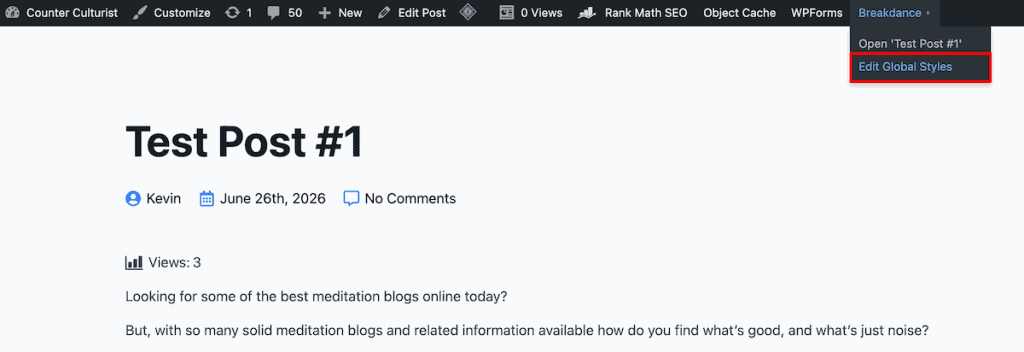
From there you’ll find separate tabs for Colors, Typography, Buttons, and much more.
Before you build individual pages, set your brand colors, typography, button styles, and container defaults once in the global settings. These apply across the whole site. Change your primary color later, and it updates everywhere that color is used.

Build your header and footer
Headers are created from the WordPress admin, not inside a single page. Go to Breakdance > Headers in your dashboard and click Add Header. Give it a title, set its location (choose Everywhere if you want it site-wide), then open it in Breakdance to design it.

Breakdance includes a proper header builder, so you design your site header visually instead of settling for whatever a theme hands you. You can place your logo, menu, search, buttons, or cart wherever you want, and create overlay headers that sit on top of a hero image, plus sticky headers that stay put as visitors scroll.
All you have to do is click the + icon. Then, add different elements or blocks from the left-hand menu.

The footer works through the same builder, just go to Breakdance > Footers, click Add Footer, set where it should appear, then design it. On the Pro plans, you can also build a mega menu for sites with many pages, turning a cramped dropdown into a wide, multi-column layout you design yourself.
Create your theme templates
Because Breakdance is a full-site builder, you design templates that control the repeating parts of your site. That includes your blog archive, single post layout, category and tag pages, search results, the 404 page, and templates for any custom post type.
To build a template, go to Breakdance > Templates in your dashboard and click Add Template. When you add one, you pick its type and set a location and conditions to control where it applies.

Then, you can click Edit in Breakdance and it’ll bring you to a similar editor to the header editor above.

You build one template, and it applies everywhere that content type appears. Set up your single post template once, for example, and every blog post you publish uses it automatically. This template system is what lets you design the whole site instead of one page at a time.
Working with Global Blocks
A Global Block is a piece of content you design once and reuse anywhere, like a newsletter signup, a testimonials row, or a call-to-action banner. Edit the block, and every page using it updates automatically.
To create one, go to Breakdance > Global Blocks and click Add Global Block.

Then, click Edit in Breakdance and you’ll be in the same builder screen you’ve already seen. Drop it onto a page with the Global Block element, or use the shortcode Breakdance generates to place it in the standard WordPress editor.

Templates control the layout of a whole content type, like every blog post. Global Blocks are for a specific chunk of content you want to reuse on pages you build individually.
Using the Popup Builder
Breakdance has a built-in Popup Builder, so you can create email opt-ins, promo banners, and cookie notices without a separate popup plugin. The basic version is free, and the Pro plans add the advanced triggers.
To build one, go to Breakdance > Popups and click Add Popup. You can set conditions and triggers, but they are very limited on the free version.

You’ll design the popup in the same builder screen you’ve used above.

The free plan covers basic popups and the click trigger. Triggers like page load, scroll, and exit intent are Pro, so a popup that fires when someone scrolls halfway down a post is an upgrade feature.
Use the design library
If you don’t want to start from a blank page, Breakdance comes with a large design library. There are over a thousand page and section templates, plus more than 37 one-click complete websites you can import and then edit with your own content.
To get to the design library go to Breakdance > Design Library. Then, hover over any site template and click Preview to see what it looks like in real-time or Import to import the site.

You can bring in a full pre-built site or grab a single section, like a pricing table or a testimonials block, and drop it into a page you’re already working on. It’s a fast way to get a professional layout without having to design every piece from scratch.
Building a Store with WooCommerce
If you’re running an online shop, Breakdance has one of the stronger native WooCommerce setups among page builders. You get more than twenty WooCommerce elements and can design your product pages, shop archive, cart, checkout, and account pages visually, all inside the same editor.
Elements like the product price, product images, add-to-cart button, and product description can be placed and styled individually. You can also build custom product loops to control exactly how products display in your shop.
All of this is built in. With some other builders, matching this level of store customization means the premium plan plus extra WooCommerce add-on plugins. Breakdance keeps it under one roof, which means fewer plugins and fewer compatibility headaches on the pages where speed matters most for conversions.
Breakdance Free vs Pro
The free version of Breakdance is usable on its own, not a stripped-back demo. You can build a full website on it, use it on unlimited sites, and there’s no time limit. It includes 80 elements, a basic form builder, a basic pop-up builder, basic dynamic data, and basic WooCommerce support.
The Pro version adds the deeper features:
- The full set of 145 elements
- The complete design library, including the one-click websites
- Full WooCommerce integration for custom shop, product, cart, and checkout pages
- The complete form builder, which connects to Mailchimp, ActiveCampaign, ConvertKit, Drip, MailerLite, GetResponse, Slack, and Discord, and can send submissions to a webhook
- The full pop-up builder with advanced targeting rules
- Full dynamic data, including post loop building, ACF and Metabox integration, and repeater fields
- Craft With Code for writing PHP and HTML directly
- The CSS Class Manager, element presets, and settings import and export
- Adobe and custom font support
For a simple site or a basic blog, the free version can carry you a long way. Once you need real store customization, marketing integrations, or dynamic content, the Pro features start to earn their keep.
Breakdance Pricing
Breakdance keeps its pricing simple. Your renewal price stays the same as the rate you pay in the first year, so you won’t be charged a higher rate later.
Plan | price | what you get |
|---|---|---|
Free | $0 | 80 elements, basic form, popup, and dynamic data, basic WooCommerce, unlimited sites |
Pro (1 site) | $99.99/year | All Pro features on a single site |
Pro (unlimited) | $199.99/year | All Pro features on unlimited sites |
Every plan includes a 60-day money-back guarantee, giving you 2 months to test the Pro features before committing.
For freelancers and agencies, two details matter. You can use Breakdance on sites you build for clients, and those clients don’t need to buy their own license. And installs on local, staging, and development sites don’t count against your license limit.
If you stop paying, Breakdance doesn’t switch off pro functionality on sites you’ve already built. Your pages keep working, and you keep the pro features already in the plugin. What you lose is access to updates, support, and the design library. That’s a friendlier setup than tools that break your site the moment you stop renewing.
How Breakdance Compares to Other WordPress Builders
Breakdance isn’t the only serious builder out there, and the right pick depends on how you work. Here’s how it compares to the main alternatives.
Breakdance vs Elementor
Elementor is the big one, with more than ten million active installs. Its main advantage is ecosystem size. You’ll find more tutorials, more third-party add-ons, and more ready-made templates for Elementor than for any other builder, which helps beginners who learn by copying and tweaking.
Where Breakdance wins is price and performance. Elementor Pro is sold in tiers based on how many sites you can use it on, starting at $59 a year for one site and climbing through several higher plans for agencies, each still capped at a set number of sites.
Breakdance charges $199.99 a year for genuinely unlimited sites, with no cap. Breakdance also produces cleaner code and includes features, like full WooCommerce building, that Elementor spreads across its higher tiers and third-party plugins. If you don’t need the giant add-on library, Breakdance is the stronger technical choice.
Breakdance vs Bricks
Bricks is the builder for people who’s main priorities are raw performance and a lifetime license. It’s known for fast, clean output and a one-time payment option instead of an annual fee, which appeals to anyone who doesn’t want a yearly bill.
Breakdance answers with a larger built-in design library and, for many people, a friendlier interface. If you value a lifetime deal above all, look hard at Bricks. If you want more templates and a slightly smoother path in, Breakdance is a solid choice.
Breakdance vs Oxygen
Both Breakdance and Oxygen come from Soflyy. Oxygen is a complete theme replacement aimed at developers who want total control over the underlying code. Breakdance covers a lot of the same ground with a more approachable interface.
If you’re a developer who wants to work closely with HTML and CSS, Oxygen might be a good fit. For most freelancers and site owners who want that level of control without the steeper climb, Breakdance is the easier place to land.
Breakdance vs Divi
Divi has a large, loyal user base and a design library with thousands of layouts. Its trade-off is performance. Divi sites can carry more code weight, and users switching to Breakdance often report faster pages and fewer plugins afterward. If you already own a Divi lifetime license and you’re happy with your page speed, there’s no urgent reason to move. If speed is nagging at you, Breakdance is worth a test.
Breakdance FAQs
Is Breakdance a theme or a page builder?
It’s a page builder, or, more precisely, a full-site builder. It installs as a plugin and can either work alongside your existing theme or run in themeless mode, where it replaces the theme and handles your entire site design. So even though people search for the Breakdance theme, what they’re really after is the builder.
Is Breakdance free?
Yes, there’s a real free version. It works on unlimited sites with no time limit and includes 80 elements, a basic form and popup builder, and basic WooCommerce support. You can build a complete website on it. The Pro plans, starting at $99.99 a year, add the full element set, the design library, marketing integrations, and advanced dynamic data.
Does Breakdance slow down your website?
Breakdance is built to stay light. It loads assets only for the elements on each page and includes a setting that strips out unnecessary WordPress code. It usually scores well on Core Web Vitals. As with any builder, your hosting, images, and other plugins still affect your final speed.
Will Breakdance stop working if I don’t renew?
No. Your sites keep running, and the pro features already in the plugin continue to work. Renewing gives you continued access to updates, support, and the design library, but Soflyy doesn’t disable functionality on sites you’ve already built.
Can I use Breakdance for client sites?
Yes. You can build client sites with a single license, and your clients don’t need to buy their own. Breakdance also includes a client-access mode that lets clients edit text and swap images without breaking the design. Local and staging installs don’t count toward your license limit either.
Closing Thoughts: Is Breakdance Right for You?
Breakdance has built its reputation on doing a lot within a single plugin while keeping pages fast. You get a real header and footer builder, full control over your site templates, a form and popup builder, deep WooCommerce support, and dynamic data, all without stacking on extra plugins.
For most site owners, the free version is a fair place to start. Install it, turn off your theme if you want a clean canvas, set your global colors and fonts once, and build from there. If you later need the full WooCommerce features, marketing integrations, or dynamic content, the Pro plan at $99.99 for one site or $199.99 for unlimited sites is reasonable. Agencies managing client work get the most from the unlimited tier.
The 60-day money-back guarantee means you can test the paid features on a real project and step back if it doesn’t click. Pair it with a fast WordPress host, check your page speed before and after, and you’ll know pretty quickly whether Breakdance is the builder you want to stick with.
Now over to you. Are you thinking about trying Breakdance, or have you already switched to it from another builder? Share your experience in the comments below.
Ready to build your WordPress site?
Try our service free for 14 days. No obligation, no credit card required.


