

Have you ever landed on a website and felt lost, with no idea where you were or how to get back to where you started? That’s a common problem that breadcrumbs solve.
Breadcrumbs are a secondary navigation system that shows users exactly where they are on your website. They create a visual path that allows visitors to see their current location in relation to your site’s hierarchy and easily navigate back to previous pages.
Not only do breadcrumbs improve user experience, but they’re also great for SEO. Google loves them so much that they often display breadcrumbs in search results, making your listings stand out and potentially increasing your click-through rates.
Below, you’ll learn what WordPress breadcrumbs are, why they matter, and five different methods to add them to your site.
Table of Contents
Understanding WordPress Breadcrumbs
WordPress breadcrumbs are navigational links that appear at the top of your website pages, showing visitors their current location in relation to the rest of your site. They typically display as a horizontal line of links separated by symbols like arrows, slashes, or other dividers.
Just like this:

Here’s how a typical breadcrumb trail looks:
Home > Category > Subcategory > Current Page
Each element in the trail is clickable, allowing users to navigate back to any previous level easily.
Types of WordPress Breadcrumbs
There are three main types of breadcrumbs you can implement on your site:
- Hierarchy-based breadcrumbs. These show your site structure from the home page to the current page and are the most common type.
- Attribute-based breadcrumbs. Commonly used in eCommerce sites, these show the attributes or filters a user selected to reach the current page or product.
- History-based breadcrumbs. These show the actual path the user took to reach the current page, essentially functioning as a visual “back” button.
Why You Should Add Breadcrumbs to Your WordPress Site
Breadcrumbs offer several key benefits for both your visitors and your website as a whole. Here’s a quick overview:
- They offer an improved user experience and help visitors understand where they are on your website
- Can reduce bounce rates by making it easy for visitors to find their way around your site
- They can improve your SEO and search engine rankings, since it helps the search engines better understand your site structure
- Improves your search result visibility since Google often displays breadcrumbs in search results
- Makes it easier for search engines to crawl your site by offering better internal linking.
How to Add Breadcrumbs in WordPress
Now that you understand what breadcrumbs are and why they’re important, let’s look at five different methods you can use to add them to your WordPress site.
Before we jump in, the easiest way to add breadcrumbs to your site is with a plugin or theme you’re already using. So, if you’re using one of the WordPress SEO plugins below, then you can simply use that plugin to enable breadcrumbs.
Or, if the WordPress theme you’re using supports breadcrumbs, then that’s a super simple way to enable breadcrumbs on your site too. Neve Pro, for example, supports breadcrumbs.
With that said, let’s get into the methods.
1. Add Breadcrumbs to WordPress with Rank Math SEO
The first approach we’ll show you is using Rank Math SEO, since it’s one of our favorite SEO plugins. First, you need to install and activate the plugin.
Once it’s live on your site, navigate to Rank Math SEO > General Settings and click on Breadcrumbs. Then, all you need to do is turn on the toggle.

After that, additional settings will appear that allow you to customize the appearance of your breadcrumbs. You can change things like the homepage label, separator character, category options, and more. Once you’re finished, make sure you save your changes.

Now, you need to add the breadcrumbs to your site so they’ll display on the front end. To do this, you’ll be adding code to WordPress. Some common places to add the code are on individual posts, pages, and products.
There are specific template files that correspond to different areas of your site. For example, if you add the code to your single.php file, then your breadcrumbs will display on your individual blog posts. If you add the code to your header.php file, it will display site-wide.
One thing we recommend is using a child theme to add code to WordPress. That way, the changes you make won’t disappear during theme updates.
Regardless of the approach you take, all you need to do is paste the following code snippet where you want your breadcrumbs to appear.
<?php if (function_exists("rank_math_the_breadcrumbs")) rank_math_the_breadcrumbs(); ?>Alternatively, you can add breadcrumbs to your site by using the shortcode:
[rank_math_breadcrumb]Simply use the shortcode block and add the shortcode above, and the breadcrumbs will display on that page or post. This is a simple way if you only want to add breadcrumbs to specific pages or posts on your site.
Here’s how the Rank Math breadcrumbs appear on your website:

2. Add Breadcrumbs to WordPress with Yoast SEO
If you’re using Yoast SEO, then adding breadcrumbs is straightforward since the functionality is built right in, just like the Rank Math SEO plugin above.
First, you need to install and activate the Yoast SEO plugin if you haven’t already. Once the plugin is activated, you’ll need to add the Yoast breadcrumb code to your website.
Then, decide where you want the breadcrumbs to appear. The most common locations are below the header, above the content, or even in the sidebar.
Alternatively, if you want breadcrumbs only on specific templates, you can add the code to single.php (for posts) or page.php (for pages). You can even add the code to the bottom of your header.php file if you want it to appear sitewide.
<?php
if ( function_exists('yoast_breadcrumb') ) {
  yoast_breadcrumb( '<p id="breadcrumbs">','</p>' );
}
?>
Just like we mentioned in the Rank Math SEO section above, one of the best ways to add code to your site is by using a child theme. That way, your WordPress breadcrumbs won’t get deleted when you update WordPress theme.
You can also add Yoast breadcrumbs to your site with the included Yoast Breadcrumbs block. All you have to do is search for Yoast Breadcrumbs and add the block as you would any other WordPress block.

Once you’ve added the code snippet above (or are going to use the block on specific pages and posts), you need to enable breadcrumbs in the Yoast settings. Navigate to Yoast SEO > Settings and then click on Advanced > Breadcrumbs.

On this screen, you can also customize various aspects of your breadcrumbs:
- Change the separator character
- Choose whether to show the home page link
- Select which taxonomy to use for posts (categories or tags)
- Add a prefix before the breadcrumb trail
At the bottom of the screen make sure to toggle the Enable breadcrumbs option to On.

Once you’ve customized the settings to your liking, save your changes, and your breadcrumbs will be live on your site.

3. Add Breadcrumbs to WordPress with AIOSEO
Another way to add breadcrumbs to your site is with the AOISEO plugin. This is another very popular WordPress SEO plugin. Breadcrumbs are supported with the free version of the plugin, too.
If you don’t have the plugin active on your site, then you’ll need to install and activate the plugin first. After that, navigate to All in One SEO > General Settings and then click on the Breadcrumbs tab.

Automatically, the plugin adds breadcrumbs schema markup to enhance your search results appearance.
Below, you’ll find a variety of customization options to change how the breadcrumbs display on your site.

However, to display breadcrumbs, you’ll need to add the code to your site or use the shortcode, block, or widget.
The shortcode option is pretty simple. All you need to do is add the shortcode to your site using the shortcode block, wherever you want your breadcrumbs to appear:
[aioseo_breadcrumbs]If you’re using the block editor, then search for the AIOSEO Breadcrumbs block and add it to your site that way.

If you want to add breadcrumbs to your site using a widget, then navigate to Appearance > Widgets and add the AIOSEO Breadcrumbs block, just like you would add any other block. This makes it easy to add it to your sidebar, footer, or any other widget area of your site.
Finally, like both Rank Math SEO and Yoast, you can add your AIOSEO breadcrumbs anywhere on your site by adding code to WordPress.
All you need to do is add the code snippet to your theme’s template file where you want it to appear, like your single.php file, or header.php, if you want it to display site-wide. Just like above, we recommend using a child theme when adding code to your site, so your breadcrumbs will stay in place after you update your theme.
Here is the code snippet you need to add:
<?php if( function_exists( 'aioseo_breadcrumbs' ) ) aioseo_breadcrumbs(); ?>Here’s how the breadcrumbs will appear on the front-end of your site. Note, that we added breadcrumbs to the footer widget in this example. Now, the breadcrumbs will adjust automatically based on what page is being viewed:

4. Add Breadcrumbs with a Dedicated WordPress Breadcrumbs Plugin
If you don’t want to use one of the SEO plugins above, then you can use the Breadcrumb NavXT plugin. This plugin is simple and adds breadcrumbs to your site. It’s a great choice if you’re looking for more control over your breadcrumbs and don’t need any additional SEO features.
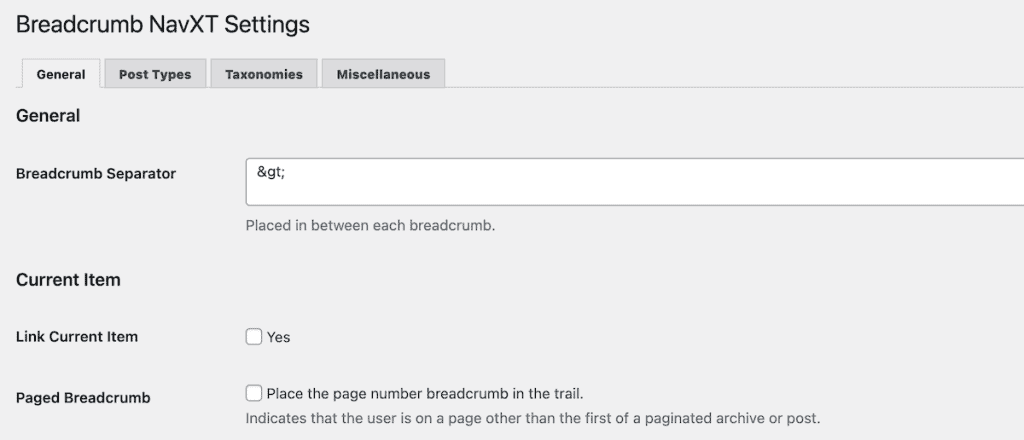
To get started, install and activate the Breadcrumb NavXT plugin on your site. Once activated, head over to Settings > Breadcrumb NavXT to configure your breadcrumb display options.
You can customize the home page link text, change the separator between links, control how different post types and taxonomies are handled, and choose whether to include the current page in the breadcrumb trail.
Adding the breadcrumbs to your site can be done in several ways.
The easiest method is using the widget. Simply go to Appearance > Widgets and add the Breadcrumb NavXT widget to your sidebar or any other widget area.

Or, you can use the included block to add breadcrumbs to your pages and posts with the block editor. Simply select the Breadcrumb Trail block to add the block to your pages and posts, like you’d add any other block.

Here’s how it appears on your website adding the breadcrumbs to a sidebar widget:

5. Use a WordPress Theme with Built-in Breadcrumbs
Many modern WordPress themes come with built-in breadcrumb functionality. If you’re using a premium theme, check the theme settings or documentation to see if breadcrumbs are included.
Popular WordPress themes like Astra, Blocksy, and OceanWP have breadcrumb options you can enable through the theme customizer.
For example, in the Astra theme, adding breadcrumbs is pretty easy.
Head over to Appearance > Customize, then go to General > Breadcrumb in your WordPress dashboard. Here you can toggle breadcrumbs on and choose exactly where you want them to appear, whether that’s below the header, above the title, or after the title.
You can also customize the separator, alignment, and more.

The major advantage of using theme-based breadcrumbs is that they’re designed to match your theme perfectly. The styling is usually consistent with the rest of your site, so you don’t have to worry about writing custom CSS.
Here’s how these theme-based breadcrumbs will appear:

The downside is that if you switch themes in the future, you’ll need to set up your breadcrumbs again since they’re tied to the theme’s functionality.
Before installing a dedicated breadcrumbs plugin, it’s worth checking if your current theme already supports this feature. You might be surprised to find that adding breadcrumbs is just a few clicks away in your theme settings.
WordPress Breadcrumbs FAQs
What is breadcrumb navigation in WordPress?
Breadcrumb navigation is a secondary navigation system that shows users their current location on your site. It appears as a horizontal line of links separated by symbols, creating a clear path from your homepage to the current page.
How do I add breadcrumbs in WordPress?
You can add breadcrumbs to WordPress using SEO plugins like Rank Math, Yoast SEO, or AIOSEO, with a dedicated plugin like Breadcrumb NavXT, or by using a theme with built-in breadcrumb functionality. Each method requires minimal setup and offers various customization options.
How do I add breadcrumbs in WordPress Elementor?
To add breadcrumbs in Elementor, you can use Elementor Pro’s built-in Breadcrumbs widget. Or, the pro versions of Rank Math SEO and AIOSEO come with a premium breadcrumb block built for elementor. Alternatively, you can use the shortcode block to add breadcrumbs with the included shortcodes for each plugin.
How do I change breadcrumb text in WordPress?
Most breadcrumb plugins let you change text elements through their settings pages. You can customize the homepage link text, separator symbols, and category/taxonomy display options to better match your site’s style and show the most useful information.
Closing Thoughts: Adding WordPress Breadcrumbs to Your Website
Adding breadcrumbs to your WordPress site is a simple yet effective way to improve user experience and boost your SEO. Whether you choose a plugin solution like Rank Math SEO, Yoast SEO, AIOSEO, or Breadcrumb NavXT, rely on your theme’s built-in features, or code a custom solution, breadcrumbs help visitors understand where they are on your site and how to navigate to related content.
Remember that the best WordPress breadcrumbs are those that accurately reflect your site’s structure. Take some time to organize your categories, tags, and content hierarchy before implementing breadcrumbs to ensure they provide the most value to your visitors.
Have you added breadcrumbs to your WordPress site? Which method did you use? Share your experience in the comments below!
Ready to build your WordPress site?
Try our service free for 14 days. No obligation, no credit card required.


