

You’ve found the perfect domain name for your business. There’s just one problem, someone else already owns it.
Maybe you want to reach out and make an offer. Maybe you’re trying to verify whether a website is legitimate before doing business with them. Or you need to resolve a trademark issue or investigate suspicious content.
Knowing how to find the owner of a domain is a valuable skill. Most domain registration information is stored in publicly accessible databases, though privacy regulations and protection services often hide the details you’re looking for.
Below, you’ll learn five proven methods to find domain owner information, what to do when that information is hidden, and how to manage the privacy settings on your own domains.
Table of Contents
Understanding Domain Registration Data (WHOIS and RDAP)
When someone registers a domain name, they must provide contact information. This data gets stored in a publicly accessible database that you can query using lookup tools.
For decades, this system was called WHOIS. As of January 28, 2025, ICANN officially replaced the WHOIS protocol with a newer system called RDAP (Registration Data Access Protocol) for generic top-level domains like .com, .net, and .org.
What does this mean for you? Practically speaking, not much. The lookup tools work the same way they always have. You enter a domain name, click search, and get back registration information. The term WHOIS is still widely used to describe these lookups, even though the underlying technology has changed.
RDAP offers some improvements over the old system, including better security, standardized data formats, and support for international characters. But from a user perspective, the experience is nearly identical.
A typical domain lookup returns the registrant’s name, organization, email, phone number, and mailing address. You’ll also find administrative, technical, and billing contacts, along with registration dates, the domain registrar, nameserver information, and domain status codes.
Important note about privacy: Since the GDPR took effect in 2018, most personal data is automatically redacted from public lookup results. This isn’t optional privacy protection that owners choose to enable. It’s the default for most registrars handling domains registered by people in the EU, and many registrars apply similar protections globally. So even without additional privacy services, you’ll often see placeholder text instead of actual contact details.
The domain owner and website owner aren’t always the same person, either. Web development agencies frequently register domains for clients under their own accounts. Or, a company might register a domain under an individual employee’s name. Understanding this can save you some frustration when you’re trying to reach the right person.
Why Would You Want to Find a Domain Owner?
There are plenty of legitimate reasons to look up domain ownership information:
- Purchasing a domain that’s already taken so you can reach out and negotiate a purchase
- Verifying a business is legitimate before entering into a relationship with them
- Investigating suspicious content like a website copying your content or impersonating your brand
- Resolving technical issues like email delivery problems or security matters
- Handling legal matters like trademark disputes or copyright infringement cases
Method 1: Search the Website Directly
Before pulling out any special tools, start with the simplest approach and check the website itself.
Most legitimate businesses display contact information somewhere on their site. Look at the Contact page, the About section, and the footer. European websites are often required by law to display ownership information in a dedicated imprint page, which can include the owner’s name, address, and contact details.
This method won’t work if the domain is registered, but the website isn’t live yet. But when it works, it’s the fastest way to find what you need.
If you’re looking to purchase a domain, visiting the website first is always a smart move. Domains that are actively for sale often prominently display that information, along with instructions for making an offer.

Method 2: Perform a Domain Lookup
The domain lookup is the most direct way to find owner information. This queries the public database where registration details are stored.
Using the ICANN Lookup Tool
ICANN provides a free lookup tool that works for most domain extensions. It now uses RDAP behind the scenes, but the interface works the same as it always has.
Here’s how to use it:
First, go to https://lookup.icann.org and enter the domain name you want to research. Then, click Lookup.
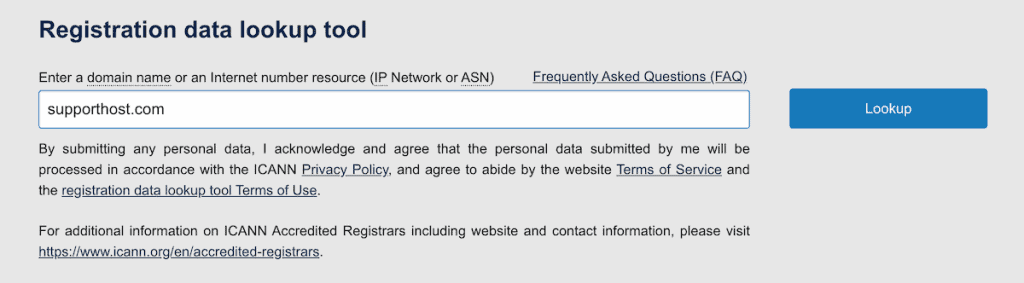
Then, all you have to do is review the registration data that appears.
The results will show you the registrar, registration dates, expiration date, domain status, and contact information for the registrant, assuming privacy protection or GDPR redaction isn’t in effect.

Understanding Domain Status Codes
When you run a lookup, you’ll see EPP status codes indicating the domain’s current state.
- clientTransferProhibited means the domain is locked and cannot be transferred
- redemptionPeriod means the domain has expired and is in a grace period
- pendingDelete means it’s scheduled for deletion and will soon become available
These codes can tell you whether a domain might become available soon or whether the owner has locked it down.
Country-Specific Lookup Tools
Different domain extensions have their own registries. The ICANN tool works for most generic top-level domains (gTLDs), but country-code top-level domains (ccTLDs) often require their own tools.
For .it domains: Use the NIC WHOIS search at the Italian registry.
For .au domains: Use the auDA database lookup tool.
For .eu domains: Use the EURid lookup tool. This also shows similar available domain names, which can be helpful if you’re exploring alternatives.

Method 3: Use Search Engines and Social Media
Sometimes, good old-fashioned detective work helps, especially when lookup data is hidden.
Search for the domain name on Google using keywords like “owner,” “contact,” or “founded by.” Use LinkedIn to search for people connected to the business. Look for job titles like “Founder,” “CEO,” or “Webmaster” tied to the company name.
This technique is especially helpful if the registration data is redacted, but the owner has a digital footprint elsewhere. Most business owners want to be found by customers, even if their domain registration details are hidden for privacy or spam protection.
Method 4: Find an Email Tied to the Domain
If the domain lookup doesn’t give you what you need, try finding an associated email address using specialized tools.
- Hunter.io is one of the most popular options. Enter a domain name, and Hunter searches the web for email addresses associated with that domain. It can often find addresses like info@, contact@, or specific employee emails.
- Snov.io offers similar functionality, including tools to find and verify email addresses associated with a domain.
- VoilaNorbert is another option that searches for emails based on domain names or company information.

These tools crawl the web and analyze domain data to discover email addresses. They’re not always accurate, but they can be a useful supplement to other methods.
Once you find an email address, reach out professionally and be clear about your intentions.
Method 5: Contact a Domain Broker
If your searches haven’t turned up any useful results and you’re serious about purchasing the domain, consider using a domain broker.
Brokers handle domain sales for a living. They can find domain owners, reach out on your behalf, and manage negotiations. This is helpful when registration data is completely hidden or when you’d prefer experienced representation for a high-value domain.
The downside is that brokers charge fees, either as a flat rate or a percentage of the sale price. We only recommend this route if you’re genuinely interested in buying.
Sedo is one of the largest domain marketplaces, with over 20 years of experience. They charge a $69 upfront fee for their acquisition service plus a 15% commission on successful purchases.
GoDaddy Broker Service assigns you a dedicated broker who handles negotiations. They charge an initial service fee plus a 20% buyer broker fee on successful purchases.
Brannans specializes in premium .com domains and has a strong track record with high-value transactions.
What to Do If the Information Is Hidden?
Between GDPR requirements and privacy protection services, you’ll often find registration data is redacted. Here’s how to work around it.
Check for contact forms in the lookup record. Even when personal details are hidden, there may still be a forwarding email address or a contact form link. Messages sent through these are typically forwarded to the actual owner.
Contact the domain registrar. The lookup record always shows the registrar for the domain. Many registrars will forward inquiries to their customers without violating privacy.
Use ICANN’s Registration Data Request Service. This service lets verified parties (like law enforcement, intellectual property attorneys, and cybersecurity professionals) request registration data from participating registrars. It doesn’t guarantee access, but it provides a formal channel for legitimate requests.
Monitor the expiration date. If you’re interested in acquiring a domain and can’t reach the owner, keep an eye on when it expires. If they don’t renew, it will eventually become available again.
Be patient and persistent. Sometimes reaching a domain owner takes multiple attempts through different channels. A polite, professional message explaining your interest often gets a response eventually.
How to Manage Your Own Domain Privacy
You can use the same lookup tools to verify what information is publicly visible for your own domains. If you find outdated information, update it through your registrar’s control panel.
If you want additional privacy beyond the automatic GDPR protections, you can enable WHOIS privacy protection (also called domain privacy). This replaces any remaining visible details with generic information while still allowing people to contact you through a forwarding service.
Some registrars charge for privacy protection, while others include it for free. All domains registered through SupportHost include free WHOIS protection, which you can enable when registering or add to existing domains at any time.
Find Domain Owner FAQs
How can I find the owner of a domain name for free?
Use a lookup tool like lookup.icann.org. Enter the domain name, and you’ll see registration data including contact details, unless privacy protection or GDPR redaction is in effect.
What is a WHOIS record?
A WHOIS record contains registration data about a domain, including the registrant’s contact details, expiration date, registrar, and nameserver information. The underlying protocol was replaced by RDAP, but the lookup process remains the same.
What should I do if the domain information is private?
If the information is private, then check the website for contact information, use the forwarding email in the lookup record, reach out via social media, try email finder tools like Hunter.io, or contact the registrar to forward your inquiry.
Can I contact a domain owner to buy their domain?
Yes. Use a lookup tool to find contact information, or try reaching out through the website, or social media. Be respectful and clear about your intent. For high-value domains, consider using a broker.
How do I hide my own domain ownership information?
Enable domain privacy protection through your registrar. This replaces your personal details with generic information while still allowing forwarded contact. Many registrars now automatically redact personal data to comply with GDPR requirements.
Closing Thoughts: How to Find the Domain Owner
Finding the owner of a domain is usually straightforward, thanks to public registration databases and the various lookup tools available. Start with the simplest methods, like checking the website itself, then move on to domain lookups if needed.
When privacy protection or GDPR redaction hides the owner’s details, don’t give up. Search engines, social media, email finder tools, and direct contact with the registrar can all help you reach the person you’re looking for.
Now over to you. Were you able to find the domain owner information you were looking for? Share your experience in the comments below.
Ready to build your WordPress site?
Try our service free for 14 days. No obligation, no credit card required.


